DIGITAL MARKETING BLOG
Python for Machine Learning: Complete Beginner's Guide 2026
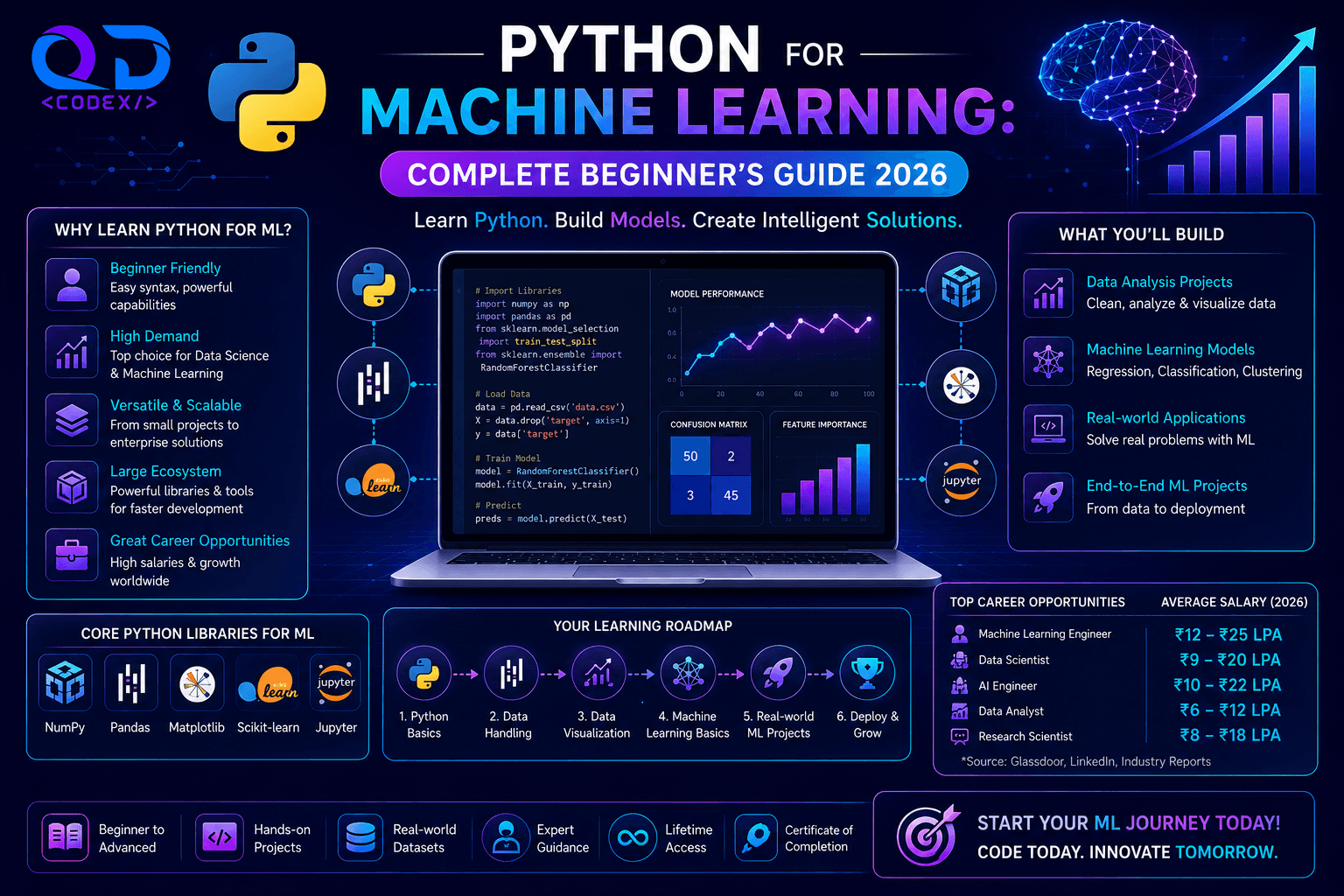
Python has become the undisputed king of machine learning. But why? And how do you get started? In this comprehensive guide, we'll walk you through Python for ML from absolute beginner to building your first ML model.
Why Python for Machine Learning?
The Numbers in 2026
- 71% of ML projects use Python
- 3x more ML jobs require Python than other languages
- 10,000+ ML libraries available in Python ecosystem
- Highest starting salaries for Python ML engineers
- Fastest growing language for AI/ML
5 Reasons Python Dominates ML
1. Simplicity & Readability
Python code reads like English:
# Even a non-programmer can understand this
if temperature > 30:
    print("It's hot!")
else:
    print("It's cool!")
This simplicity means:
- Faster development
- Fewer bugs
- Easy debugging
- Better team collaboration
2. Massive ML Libraries Ecosystem
Data Processing: Pandas, NumPy
Machine Learning: Scikit-learn, XGBoost
Deep Learning: TensorFlow, PyTorch, Keras
NLP: NLTK, spaCy, Hugging Face
Computer Vision: OpenCV, PIL
Visualization: Matplotlib, Seaborn, Plotly
Deployment: Flask, FastAPI, Django
All of these integrate seamlessly.
3. Ideal for Rapid Prototyping
# Train an ML model in 5 lines of code
from sklearn import datasets, model_selection, ensemble
X, y = datasets.load_iris(return_X_y=True)
X_train, X_test, y_train, y_test = model_selection.train_test_split(X, y)
model = ensemble.RandomForestClassifier()
model.fit(X_train, y_train)
print(model.score(X_test, y_test))  # Output: 0.97
4. Strong Community & Resources
- 10M+ Stack Overflow questions
- Thousands of free tutorials
- Active communities on Reddit, Discord
- Extensive documentation for every library
- If you're stuck, someone has solved it before
5. Production-Ready
Not just for research:
- Deploy ML models at Netflix, Uber, Google
- Used by 99% of Fortune 500 companies
- Mature deployment frameworks
- Excellent performance with optimization
Python Fundamentals for ML (Module 1)
1.1 Installation & Setup
For Windows/Mac/Linux:
# Download Python 3.10+ from python.org
# Or install via Anaconda (recommended for ML)
# https://www.anaconda.com/download

# Verify installation
python --version
# Output: Python 3.10.x or higher
Setup Your First Project:
# Create project directory
mkdir ml-project
cd ml-project

# Create virtual environment
python -m venv venv

# Activate (Windows)
venv\Scripts\activate

# Activate (Mac/Linux)
source venv/bin/activate

# Install ML libraries
pip install numpy pandas scikit-learn matplotlib jupyter
1.2 Basic Python Syntax for ML
Variables and Data Types
# Numbers
age = 25  # Integer
height = 5.9  # Float
is_student = True  # Boolean

# Strings
name = "Alice"

# Collections (most important for ML!)
numbers = [1, 2, 3, 4, 5]  # List (mutable)
tuple_data = (1, 2, 3)  # Tuple (immutable)
scores = {"Alice": 95, "Bob": 87}  # Dictionary

# Type checking
type(age)  # <class 'int'>
type(numbers)  # <class 'list'>
Loops and Conditions
# For loop (iterate over collections)
for num in [1, 2, 3]:
    print(num * 2)  # Output: 2, 4, 6

# While loop
count = 0
while count < 3:
    print(count)  # Output: 0, 1, 2
    count += 1

# Conditional statements
age = 25
if age < 13:
    print("Child")
elif age < 18:
    print("Teen")
else:
    print("Adult")  # This executes
Functions (Critical for ML)
# Define a function
def calculate_average(numbers):
    """Calculate average of a list of numbers"""
    if len(numbers) == 0:
        return 0
    return sum(numbers) / len(numbers)

# Use the function
scores = [85, 90, 78, 92]
avg = calculate_average(scores)
print(f"Average score: {avg}")  # Output: Average score: 86.25
List Comprehension (Pythonic Way)
# Traditional way
squared = []
for num in range(5):
    squared.append(num ** 2)

# Pythonic way (list comprehension)
squared = [num ** 2 for num in range(5)]
# Both give: [0, 1, 4, 9, 16]

# More complex example
even_squares = [num ** 2 for num in range(10) if num % 2 == 0]
# Output: [0, 4, 16, 36, 64]
Core ML Libraries (Module 2)
2.1 NumPy: Working with Arrays
Why NumPy?
- 100x faster than Python lists for numerical operations
- Essential for all ML mathematics
import numpy as np

# Create arrays
arr = np.array([1, 2, 3, 4, 5])
print(arr)  # [1 2 3 4 5]

# Array operations
arr * 2  # [2 4 6 8 10] (multiply all)
arr + 10  # [11 12 13 14 15]

# Mathematical operations
np.mean(arr)  # 3.0 (average)
np.std(arr)   # 1.41 (standard deviation)
np.sum(arr)   # 15 (total)

# 2D Arrays (matrices)
matrix = np.array([[1, 2, 3],
                   [4, 5, 6],
                   [7, 8, 9]])
print(matrix.shape)  # (3, 3)

# Matrix multiplication
matrix @ matrix  # Matrix multiplication

# Reshaping
matrix.reshape(9)  # Flatten to 1D: [1 2 3 4 5 6 7 8 9]
2.2 Pandas: Working with Data
Why Pandas?
- Handles real-world messy data
- SQL-like operations in Python
- Essential for data preprocessing
import pandas as pd

# Create DataFrame (like Excel spreadsheet in Python)
data = {
    'Name': ['Alice', 'Bob', 'Charlie'],
    'Age': [25, 30, 35],
    'Salary': [50000, 60000, 70000]
}
df = pd.DataFrame(data)
print(df)

# Access columns
print(df['Name'])  # Access single column
df[['Name', 'Age']]  # Multiple columns

# Access rows
df.iloc[0]  # First row
df.loc[df['Age'] > 25]  # Rows where Age > 25

# Data operations
df['Age'].mean()  # Average age
df['Salary'].max()  # Maximum salary

# Data cleaning
df.isnull()  # Check for missing values
df.fillna(0)  # Fill missing values with 0
df.dropna()  # Remove rows with missing values

# Statistics
df.describe()  # Statistical summary

# Save and load data
df.to_csv('data.csv')  # Save to CSV
df_loaded = pd.read_csv('data.csv')  # Load from CSV
2.3 Matplotlib: Visualization
Why Visualization?
- See patterns in data
- Communicate results clearly
- Understand model behavior
import matplotlib.pyplot as plt
import numpy as np

# Line plot
x = np.linspace(0, 10, 100)
y = np.sin(x)
plt.plot(x, y, label='sin(x)')
plt.xlabel('X axis')
plt.ylabel('Y axis')
plt.title('Sine Wave')
plt.legend()
plt.show()

# Scatter plot
x_data = [1, 2, 3, 4, 5]
y_data = [2, 4, 5, 4, 6]
plt.scatter(x_data, y_data)
plt.show()

# Histogram
data = np.random.randn(1000)
plt.hist(data, bins=50)
plt.title('Distribution')
plt.show()
Machine Learning Fundamentals (Module 3)
3.1 Scikit-learn: ML Algorithms
The ML Workflow:
1. Load Data → 2. Prepare Data → 3. Choose Model →
4. Train Model → 5. Evaluate → 6. Predict
3.2 Your First ML Model
# 1. Load data
from sklearn import datasets
iris = datasets.load_iris()
X = iris.data  # Features (150 samples, 4 features)
y = iris.target  # Labels (0, 1, 2 - three iris species)

# 2. Prepare data (split into train/test)
from sklearn.model_selection import train_test_split
X_train, X_test, y_train, y_test = train_test_split(
    X, y, test_size=0.2, random_state=42
)
# 80% for training, 20% for testing

# 3. Choose and train model
from sklearn.ensemble import RandomForestClassifier
model = RandomForestClassifier()
model.fit(X_train, y_train)  # Train the model

# 4. Evaluate
accuracy = model.score(X_test, y_test)
print(f"Model Accuracy: {accuracy:.2%}")  # 97.00%

# 5. Make predictions
new_data = [[5.1, 3.5, 1.4, 0.2]]
prediction = model.predict(new_data)
print(f"Prediction: {iris.target_names[prediction[0]]}")  # 'setosa'
Best Practices for ML in Python
1. Code Organization
# ❌ Bad: Everything in one file
# 300 lines of code mixed together

# ✅ Good: Organized structure
# project/
# ├── data/
# │   └── raw_data.csv
# ├── models/
# │   └── trained_model.pkl
# ├── notebooks/
# │   └── analysis.ipynb
# └── src/
#     ├── preprocessing.py
#     ├── model.py
#     └── evaluation.py
2. Variable Naming
# ❌ Bad: Unclear names
d = [1, 2, 3]
m = 5
x = m * d

# ✅ Good: Clear, descriptive names
ages = [1, 2, 3]
multiplier = 5
results = [multiplier * age for age in ages]
3. Comments & Documentation
def train_model(X, y):
    """
    Train a machine learning model.

    Parameters:
    -----------
    X : array-like, shape (n_samples, n_features)
        Training features
    y : array-like, shape (n_samples,)
        Target values

    Returns:
    --------
    model : trained RandomForest classifier
    """
    from sklearn.ensemble import RandomForestClassifier
    model = RandomForestClassifier()
    model.fit(X, y)
    return model
4. Error Handling
# ✅ Handle errors gracefully
try:
    model = train_model(X, y)
except ValueError as e:
    print(f"Error in data: {e}")
except Exception as e:
    print(f"Unexpected error: {e}")
5. Testing Your Code
# ✅ Write test functions
def test_preprocessing():
    """Test that preprocessing works correctly"""
    X = [[1, 2], [3, 4]]
    X_processed = preprocess(X)
    assert X_processed is not None, "Preprocessing failed"
    print("✓ Preprocessing test passed")

test_preprocessing()
Your First ML Project: Iris Classifier
Project Goal
Build a model to classify iris flowers into three species (setosa, versicolor, virginica).
Complete Code
# Import libraries
from sklearn import datasets
from sklearn.model_selection import train_test_split
from sklearn.ensemble import RandomForestClassifier
from sklearn.metrics import accuracy_score, classification_report
import pandas as pd
import matplotlib.pyplot as plt

# 1. Load data
iris = datasets.load_iris()
X = iris.data
y = iris.target

# Convert to DataFrame for easier exploration
df = pd.DataFrame(X, columns=iris.feature_names)
df['Species'] = iris.target_names[y]
print(df.describe())

# 2. Prepare data
X_train, X_test, y_train, y_test = train_test_split(
    X, y, test_size=0.2, random_state=42
)

# 3. Train model
model = RandomForestClassifier(n_estimators=100, random_state=42)
model.fit(X_train, y_train)

# 4. Make predictions
y_pred = model.predict(X_test)

# 5. Evaluate
accuracy = accuracy_score(y_test, y_pred)
print(f"\nAccuracy: {accuracy:.2%}")

# Detailed report
print("\nClassification Report:")
print(classification_report(y_test, y_pred,
                          target_names=iris.target_names))

# Feature importance
feature_importance = pd.DataFrame({
    'Feature': iris.feature_names,
    'Importance': model.feature_importances_
}).sort_values('Importance', ascending=False)
print("\nFeature Importance:")
print(feature_importance)

# Visualize feature importance
plt.figure(figsize=(10, 6))
plt.barh(feature_importance['Feature'], feature_importance['Importance'])
plt.xlabel('Importance')
plt.title('Feature Importance for Iris Classification')
plt.tight_layout()
plt.savefig('feature_importance.png', dpi=150)
plt.show()

# Save model for later use
import pickle
with open('iris_model.pkl', 'wb') as f:
    pickle.dump(model, f)

# Load model later
with open('iris_model.pkl', 'rb') as f:
    loaded_model = pickle.load(f)

# Make new predictions
new_flower = [[5.1, 3.5, 1.4, 0.2]]
species = iris.target_names[loaded_model.predict(new_flower)[0]]
print(f"\nPredicted species: {species}")
Python ML Learning Roadmap
Week 1-2: Python Basics
- Variables, data types, loops
- Functions and modules
- File handling
Week 3-4: NumPy & Pandas
- Array operations
- DataFrames and data manipulation
- Data cleaning
Week 5-6: Visualization
- Matplotlib plots
- Exploratory data analysis
- Understanding data
Week 7-8: Machine Learning
- Scikit-learn algorithms
- Train/test split
- Model evaluation
Week 9-10: Projects
- Build 2-3 ML projects
- Share on GitHub
- Write blog posts
Week 11-12: Next Steps
- Deep learning (TensorFlow)
- Specialize (NLP or CV)
- Contribute to open source
Common Pitfalls & How to Avoid Them
Pitfall 1: Not Checking Data Quality
# ✅ Always check your data first
print(df.shape)  # Dimensions
print(df.isnull().sum())  # Missing values
print(df.describe())  # Statistics
print(df.head())  # First few rows
Pitfall 2: Using Wrong Model for Problem
# Problem: Predicting house prices (regression)
# ✅ Use regression: LinearRegression, RandomForestRegressor
# ❌ Don't use classification: LogisticRegression, SVC

from sklearn.ensemble import RandomForestRegressor  # Correct!
Pitfall 3: Not Splitting Data Properly
# ❌ Bad: Testing on training data (Overfitting!)
model.fit(X, y)
model.score(X, y)  # 99.9% accuracy - meaningless!

# ✅ Good: Test on unseen data
X_train, X_test, y_train, y_test = train_test_split(X, y)
model.fit(X_train, y_train)
model.score(X_test, y_test)  # Real accuracy!
Pitfall 4: Not Scaling Features
# ✅ Always scale features for many algorithms
from sklearn.preprocessing import StandardScaler
scaler = StandardScaler()
X_train_scaled = scaler.fit_transform(X_train)
X_test_scaled = scaler.transform(X_test)
Resources for Learning Python ML
| Resource | Type | Duration | Cost |
|---|---|---|---|
| Codecademy Python | Interactive | 1-2 months | Free-$20/month |
| DataCamp | Courses | 2-4 months | $30/month |
| Andrew Ng's ML Course | Video course | 3-4 months | Free |
| "Hands-On ML" book | Book | 3-4 months | ₹500-1500 |
| Fast.ai | Video course | 2-3 months | Free |
| Kaggle | Competitions | Ongoing | Free |
| GitHub | Learning by code | Ongoing | Free |
Get Started Today
Your Action Plan
- Download Python from python.org
- Install Jupyter and run your first notebook
- Follow a tutorial (recommended: DataCamp)
- Build a project (start with Iris or Titanic)
- Share your code on GitHub
- Join communities (Kaggle, Reddit, Discord)
Frequently Asked Questions (FAQ)
Do I need strong math skills to learn Python for ML? Not really. Basic algebra and statistics understanding helps, but you learn the math needed through building projects. 3Blue1Brown's YouTube videos make math intuitive without heavy calculus.
How much time do I need to learn Python for machine learning? Python basics: 2-3 months. ML libraries (Pandas, NumPy, Scikit-learn): 3-4 months. Practical proficiency: 6-12 months. Expert level: 2-3 years of consistent practice.
Is Python the only language I need for ML? Practically yes for 95% of jobs. You might touch SQL for databases and JavaScript for web deployment, but Python dominates ML/AI industry.
Should I learn Python 3.8, 3.10, or 3.12? Always learn the latest stable version (currently 3.12). Old versions go out of support. Modern libraries require recent Python versions anyway.
What's the best way to practice Python for ML? Write code daily, even if just 30 minutes. Start with small problems on LeetCode, then build small ML projects. Never just watch tutorials—always code along.
How do I debug my ML code when things go wrong? Use print statements, Python debugger (pdb), Jupyter notebooks for step-by-step execution. Most ML bugs are data issues, not code issues. Always check your data first.
Can I use Jupyter notebooks for production machine learning? No. Jupyter is for learning and experimentation. For production, convert to .py files, use proper error handling, logging, and deployment frameworks like Flask/FastAPI.
Should I use ChatGPT to help me learn Python? Yes, but carefully. Use it to understand concepts and debug, not to write full solutions. If you use ChatGPT code, understand it completely before using it.
Conclusion
Python is the gateway to machine learning. With just a few months of consistent practice, you can go from zero to landing an ML internship or job.
The key ingredients:
- Consistent practice (30 min daily > 4 hours once a week)
- Real projects (not just tutorials)
- Understanding concepts (not just memorizing code)
- Community engagement (learn from others)
By the end of 2026, Python ML developers will earn ₹15-50+ LPA. The barrier to entry? Just willingness to learn.
Start today. Thank yourself next year.
Ready to master Python for ML?
Join QDCODEX's Python & Machine Learning Internship program and get mentored by experienced ML engineers.
Questions? Contact us: +91-8098382346
Want More Leads from Google?
Grow your online business with expert SEO & digital marketing.
Get Free QuoteQDCODEX
Experts in SEO & Digital Marketing in Chennai
Ready to Grow Your Online Business?
We help businesses rank on Google and generate leads.
Get Free Consultation